
Best Wireless Mouse for Work, Travel and Gaming
As an Amazon Associate I earn from qualifying purchases. Some links may earn us a commission at no extra cost to you.
Every mouse here tracks smoothly, so the decision that matters is how it connects. A USB receiver gives you plug-and-play setup and the most stable signal, but it needs a USB-A port, which many newer laptops no longer have. Bluetooth needs no dongle at all and pairs with tablets and phones too, and the best models switch between several computers with one button. Pick the connection that fits your setup, then pick the shape that fits your hand. So I score these on comfort, connection, battery life and value, and the picks are grouped by how you will use them. Scores come from manufacturer specs and live customer ratings; we did not test these ourselves.
Jump to a pick
- Logitech M510: Best overall
- Logitech M720 Triathlon: Best for multiple computers
- Logitech MX Master 3S: Best for productivity
- Logitech Signature M550 L: Best for large hands
- Logitech M330 Silent Plus: Best silent mouse
- Logitech M196 Bluetooth: Best for laptops and tablets
- HP X3000 G3: Best budget pick
- Logitech G502 Lightspeed: Best feature-packed gaming mouse
- Apple Magic Mouse: Best for Mac
Top picks
Everyday work and the home office
Logitech M510 — Best overall

- Your hand can relax in comfort hour after hour with this ergonomically designed mouse. Its contoured shape with soft rubber grips, gently curved sides and broad palm area give you the support you need for effortless control all day long.
- You’ve got the control to do more, faster. Flipping through photo albums and Web pages is a breeze, especially for right-handers—with three standard buttons plus Back/Forward buttons that you can also program to switch applications, go full screen and more. And side-to-side scrolling plus zoom gives you the power to scroll horizontally and vertically through your music library, maps and Facebook feeds, and zoom in and out of photos and budget spreadsheets with a click.* * Requires Logitech SetPoint software (Windows) or Logitech Control Center software (Mac OS X)
- Two years of battery life practically eliminates the need to replace batteries. ** The On/Off switch helps conserve power, smart sleep mode extends battery life and an indicator light eliminates surprises. ** Battery life may vary based on user and computing conditions.

Why it wins: Thirty five thousand ratings at 4.6 and ten thousand sold last month. A full-size mouse that fits most hands comfortably, with a plug-in USB receiver and battery life Logitech rates at up to two years, so it simply works for a very long time.
Pros
- Full-size shape that suits most hands
- Battery life rated at up to two years
- Plug-and-play USB receiver
- Large owner base with a high rating
Cons
- Receiver needs a USB-A port
- Plain design
Skip it if: your laptop has only USB-C ports, where the Bluetooth picks below fit better.
Scores: Comfort 5/5 | Connection 4/5 | Battery life 5/5 | Value 5/5
Logitech M720 Triathlon — Best for multiple computers
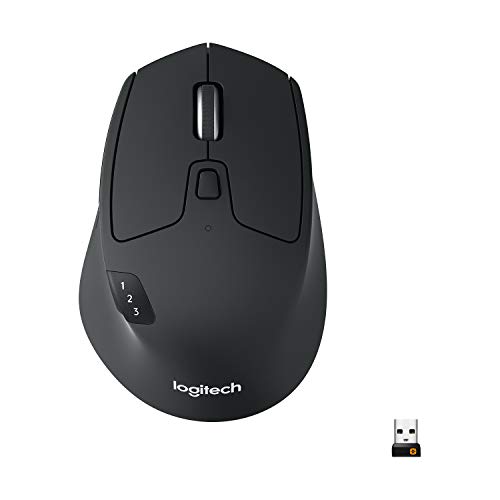
- Long-lasting and Versatile: Designed for endurance with 24-month battery life (1), M720 is compatible with computers, laptops and tablets, Windows, macOS, Chrome OS, Linux, and iPadOS.
- Comfortable Grip: Crafted for the right hand, this full-sized wireless PC mouse features a rubber body and a sculpted design for palm rest grip and comfort like never before
- Hyper-Fast Scrolling: Fly through long documents and web pages with a simple spin of the mouse wheel with the additional instant-stop feature and an option to switch to click-to-click scrolling
Why it wins: Thirteen thousand ratings and ten thousand sold last month. It pairs with three devices over Bluetooth or its USB receiver and switches between them with one button, so a work laptop, home PC and tablet can share one mouse.
Pros
- Switches between three devices at a button press
- Bluetooth and USB receiver both included
- Long battery life on a single AA
Cons
- Larger shape suits medium to large hands
- More buttons than a simple user needs
Skip it if: you only ever use one computer, where the M510 is simpler.
Scores: Comfort 4/5 | Connection 5/5 | Battery life 5/5 | Value 4/5
Logitech MX Master 3S — Best for productivity

- Logitech MX Master 3S Bluetooth Edition is a Bluetooth only mouse, and does not come with any USB receiver / adapter or charging cable
- 8K DPI Any-surface tracking: Use MX Master 3S cordless computer mouse to work on any surface - even glass (1) - with an 8000 DPI sensor with customizable sensitivity
- Quiet Clicks: MX Master 3S Bluetooth mouse with Quiet Clicks - offering the same satisfying feel but with 90% less click noise (2)
Why it wins: The mouse many professionals swear by: a sculpted shape that supports the whole hand, quiet clicks, a fast electromagnetic scroll wheel that flies through long documents, and a thumb wheel for side scrolling. It recharges over USB-C.
Pros
- Sculpted shape supports the whole hand
- Fast scroll wheel for long documents and spreadsheets
- Quiet clicks
- Rechargeable over USB-C
Cons
- This version is Bluetooth only, with no receiver in the box
- Right-handed design
Skip it if: you are left-handed, where the M510 or M196 work for either hand.
Scores: Comfort 5/5 | Connection 4/5 | Battery life 4/5 | Value 4/5
Logitech Signature M550 L — Best for large hands

- Scroll smarter: With Logitech Signature M550 Wireless Mouse you get line-by-line precision for documents and super-fast scrolling for long web pages; simply switch modes with a flick of the SmartWheel
- The optimal fit for your hand: This comfortable full size mouse is designed for larger hands, for the optimal fit
- Upgrade your comfort: This work mouse provides long hours of comfort thanks to a contoured shape, soft thumb area, and rubber side grips that keep your hand snug and in place
Why it wins: Sized specifically for larger hands, which is the comfort fix most people miss. It connects by Bluetooth or a USB receiver, has quiet clicks, and Logitech rates the battery at up to two years.
Pros
- Shaped for large hands
- Bluetooth and USB receiver both supported
- Quiet clicks
Cons
- Too big for small hands
- Smaller review base than the long-running Logitechs
Skip it if: you have small or medium hands, where the M510 fits better.
Scores: Comfort 5/5 | Connection 5/5 | Battery life 5/5 | Value 4/5
Quiet, compact and budget picks
Logitech M330 Silent Plus — Best silent mouse

- Quieter Click: Logitech’s SilentTouch Technology reduces over 90 percent (1) of clicking sounds — ensuring top performance while contributing to a quieter working environment
- Crafted for Comfort: Design with naturally shaped contoured plastic grips, the M330 SILENT wireless mouse is built for long-lasting comfort and functionality for right-handed users
- Long Battery Life: M330 SILENT has a 18-month battery life (2) and power saving auto-sleep mode; it allows you to focus on your work without the hassle of changing batteries (1 x AA included)
Why it wins: Twenty five thousand ratings at 4.5. Logitech’s silent switches cut click noise dramatically, which matters in shared offices, libraries and late nights next to someone sleeping.
Pros
- Very quiet clicks
- Comfortable contoured shape
- Long battery life
- Large owner base
Cons
- Right-handed shape
- Receiver needs a USB-A port
Skip it if: you need Bluetooth, where the M196 is the quiet compact option.
Scores: Comfort 4/5 | Connection 4/5 | Battery life 5/5 | Value 5/5
Logitech M196 Bluetooth — Best for laptops and tablets

- Convenient Portable Mouse for Laptops and Tablets: The Logitech M196 Bluetooth Wireless Mouse connects in seconds with a reliable pair-and-play Bluetooth connection, no dongle or port required, and works with MacBook Neo laptops and other Apple, Windows, and Chromebook devices
- Comfortable, Travel-Ready Design: This Bluetooth travel mouse is lightweight and fits in any bag; its contoured, ambidextrous shape is comfortable for both left and right hands
- Works on a Variety of Surfaces: With precise line-by-line scrolling and optical tracking; the M196 Wireless Bluetooth Mouse provides smooth and accurate cursor control on nearly any surface
Why it wins: Nearly seven thousand ratings at 4.5 and ten thousand sold last month. A compact Bluetooth mouse with no dongle to lose, so it works with USB-C laptops, iPads and Chromebooks straight away.
Pros
- No receiver needed
- Compact and easy to carry
- Works with either hand
Cons
- Small for long desk sessions
- Bluetooth pairing takes a minute the first time
Skip it if: you work at a desk all day, where a full-size mouse is more comfortable.
Scores: Comfort 3/5 | Connection 5/5 | Battery life 4/5 | Value 5/5
HP X3000 G3 — Best budget pick

- COMFORTABLE DESIGN: Contoured, wireless optical mouse with 3-button navigation and integrated scroll wheel lets you be productive all-day using either-hand; multi-OS (1), multi-device optical mouse and gives you the freedom to work or play from almost anywhere
- WIRELESS CONVENIENCE: Go cordless with 2.4 GHz USB-A connectivity that keeps you connected up to a range of 30 feet; USB nano receiver stores inside the mouse for easy portability
- MULTI-SURFACE PERFORMANCE: Be ready for anything with LED multi-surface technology that smooth, lag-free movement on virtually any surface (2)
Why it wins: Eleven thousand ratings at 4.5 and five thousand sold last month. A simple, reliable wireless mouse at one of the lowest outlays here, with side grips and battery life HP rates at up to fifteen months, which makes it ideal for a spare, a student or a second desk.
Pros
- Lowest cost of entry from a major brand
- Battery life rated at up to fifteen months
- Rubber side grips
- Compact enough to travel
Cons
- Basic shape with no extra buttons
- Receiver needs a USB-A port
- Runs on an AA battery
Skip it if: you spend all day at the computer, where the M510 is worth the step up.
Scores: Comfort 3/5 | Connection 4/5 | Battery life 5/5 | Value 5/5
For gaming
Logitech G502 Lightspeed — Best feature-packed gaming mouse

- The G502 LIGHTSPEED keeps the original shape and layout unchanged, yet the internal structure is redesigned for LIGHTSPEED and POWERPLAY compatibility, with a 1.2mm thin-wall endoskeleton and a weight reduction of 7 grams for this wireless mouse
- The gaming mouse wireless HERO 25K sensor is capable of achieving 400+ IPS tracking speed across the entire 25,600 DPI range and up to 10x the power efficiency vs previous generations, detecting movements at the sub-micron level
- The LIGHTSPEED ecosystem of wireless technologies is trusted by esports professionals to deliver pro-grade, ultra-fast and reliable gaming performance with this wireless mouse
Why it wins: Thirteen thousand ratings at 4.6. The wireless version of one of the best-loved gaming mice of the last decade, with eleven programmable buttons, adjustable weights and a rechargeable battery.
Pros
- Eleven programmable buttons
- Adjustable weights to tune the feel
- Rechargeable battery
- Large owner base
Cons
- Heavier than lightweight esports mice
- Large shape for small hands
Skip it if: you want a light, simple mouse, where the M510 suits better.
Scores: Comfort 4/5 | Connection 5/5 | Battery life 4/5 | Value 4/5
For Mac
Apple Magic Mouse — Best for Mac
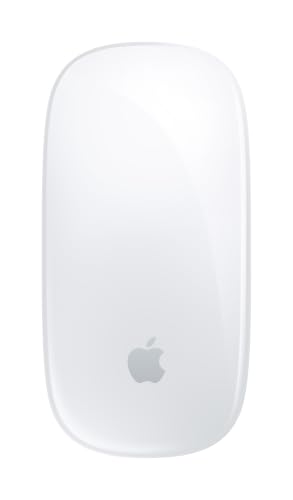
- Magic Mouse is wireless and rechargeable, with an optimised foot design that lets it glide smoothly across your desk.
- The Multi-Touch surface allows you to perform simple gestures such as swiping between web pages and scrolling through documents.
- The rechargeable battery will power your Magic Mouse for about a month or more between charges.
Why it wins: Ten thousand sold last month. Its touch surface supports the swipe and scroll gestures built into macOS, it pairs with a Mac instantly, and it now charges over USB-C.
Pros
- Multi-touch gestures built for macOS
- Pairs with a Mac instantly
- Slim, minimal design
- USB-C charging
Cons
- Charging port sits underneath, so it cannot be used while charging
- Low profile is less supportive for long sessions
Skip it if: comfort over long hours matters most, where the MX Master 3S works with Mac too.
Scores: Comfort 3/5 | Connection 5/5 | Battery life 4/5 | Value 3/5
Quick compare
- Best overall: Logitech M510, needs a USB-A port
- Multiple computers: Logitech M720, larger shape
- Productivity: MX Master 3S, Bluetooth only in this version
- Large hands: Signature M550 L, too big for small hands
- Silent: M330 Silent Plus, right-handed
- Laptops and tablets: M196 Bluetooth, compact
- Budget: HP X3000 G3, basic shape
- Gaming features: G502 Lightspeed, heavier
- Mac: Magic Mouse, charges underneath
Two checks make the right mouse obvious. Look at your laptop’s ports first: if it has only USB-C, choose Bluetooth or plan on a small adapter. Then measure your hand from wrist to fingertip, because a mouse that fills your palm is what stays comfortable through a full workday. Get those two right and any pick here will serve you for years.
As an Amazon Associate, I earn from qualifying purchases.