
Best Home Printer Scanners for Documents, Photos, and Home Offices
As an Amazon Associate I earn from qualifying purchases. Some links may earn us a commission at no extra cost to you.
The best home printer scanner should make everyday jobs easier without creating high supply costs or a frustrating scanning workflow. I focused on document handling, print quality, maintenance, connectivity, and suitability for different homes.
How I researched — I compared recent 6–12 month roundups, deep dives, and manufacturer spec sheets, prioritized document workflow speed, print quality, page yield, and maintenance, checked ADF, duplex, mobile, and computer compatibility, noted availability and EOL status, and weighed performance against durability and ownership costs. I also checked official CPSC and manufacturer recall resources but couldn’t verify an exact-model recall for these five printers.
My primary category metric is document workflow. Print speed matters, but automatic feeding, two-sided scanning, paper capacity, and setup friction usually determine how quickly a complete print-or-scan job gets finished.
Top picks
Epson EcoTank ET-4950 — Best for most homes
My best overall pick combines refillable ink, a 30-sheet ADF, and automatic two-sided printing and scanning.
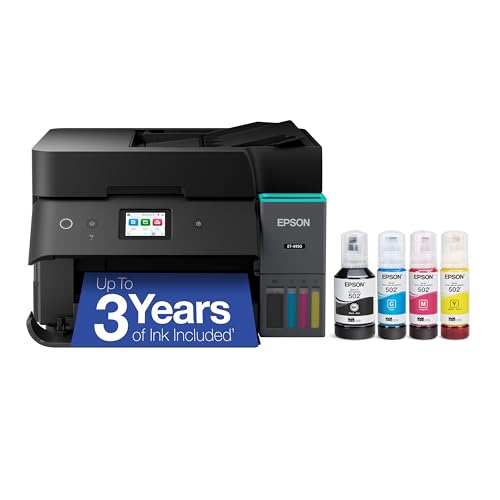
- Epson EcoTank Wireless All-in-One Ink Tank Printer – Cartridge-Free System, High-Capacity Ink Bottles, Mobile Printing, Auto Duplex
- WORRY-FREE PRINTING — Epson EcoTank comes with enough ink to print up to 6,600 pages black/5,500 color⁹ for fewer out-of-ink frustrations. Each replacement ink bottle set is equivalent to about 80 cartridges¹⁰
- SIMPLE INK REFILLING — Supersized ink tanks and uniquely keyed EcoFit bottles make refilling ink simple—no mess, no stress and no ink bottle mix-ups
Why it wins: The ET-4950 handles frequent documents without sacrificing color or occasional photo output. Epson rates it at 18 black and 9 color ISO pages per minute and equips it with a 250-sheet tray, fax, Ethernet, Wi-Fi, mobile printing, and a small color touchscreen.
Independent testing found high page yields, low printing costs, detailed documents, good scan quality, and genuinely useful duplex scanning. Color accuracy is only average, and the printer can be slow to wake after sitting idle.
Pros
- Automatic two-sided printing and scanning
- High-capacity refillable ink tanks
- 250-sheet paper tray
- Strong document and scan quality
Cons
- Small touchscreen
- No second paper tray
- Slow wake-up after idle periods
Social proof: See reviews on Amazon.
Trade-offs / Who should skip
I would skip it for professional photo editing where precise color accuracy matters. I would also choose a laser model if the printer may remain unused for very long periods.
Scores: Performance 4.6/5 | Document Workflow 4.8/5 | Ease of Use 4.4/5 | Value 4.7/5
Brother MFC-J4555DW — Best for a busy shared household
My shared-home pick offers two paper trays, fast document printing, and flexible wired and wireless connections.
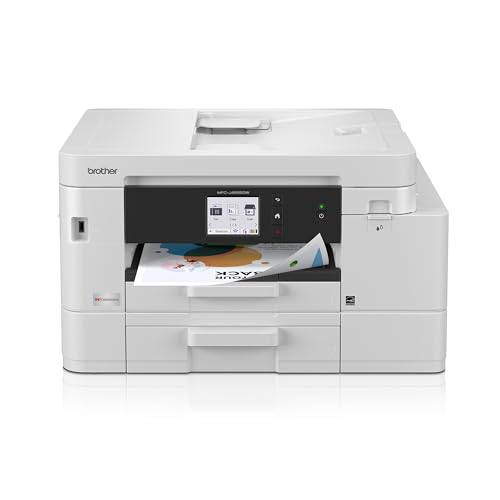
- BEST FOR SMALL OFFICE AND SMALL BUSINESS: This multifunction printer makes it easy to print, copy, scan, and fax —all in one compact printer. Includes one 1,800-page yield black cartridge and 750-page yield cartridges each cyan, yellow, and magenta(2).
- INNOVATIVE CONNECTIVITY TECHNOLOGY: Connect your way via ethernet, wireless network, or USB connection. Wi-Fi Direct enables convenient wireless printing, even without an external network connection. Front USB Port provides plug-and-print convenience(3).
- CLOUD APP CONNECTIONS: Print from and scan to popular Cloud apps(4), including Google Drive, Dropbox, Box, OneDrive, and more with an impressive 2.7” color touchscreen that enhances clarity and ensures effortless operation.

Why it wins: Two trays provide a combined 400-sheet capacity, making it easier to keep different paper types or sizes ready. It also includes a 20-sheet ADF, automatic duplex printing, Ethernet, Wi-Fi Direct, a front USB port, and a 2.7-inch touchscreen.
Brother rates it at up to 20 pages per minute. The stored footprint is 17.1 by 14 by 9.8 inches, and the verified limited warranty lasts two years.
Pros
- Two trays hold 400 sheets
- Quick plain-paper document printing
- Front USB host port
- Two-year limited warranty
Cons
- No automatic duplex scanning
- ADF holds only 20 sheets
- Photos are not its strongest output
Social proof: See reviews on Amazon.
I would skip it for regular scanning of two-sided contracts or school packets. The feeder scans one side only, requiring every stack to be flipped manually.
Scores: Performance 4.3/5 | Document Workflow 4.1/5 | Ease of Use 4.5/5 | Value 4.4/5
Epson EcoTank Photo ET-8500 — Best for photos and creative projects
My photo pick uses six refillable inks for detailed photos, crafts, invitations, and everyday color printing.

- Epson's Claria ET Premium 6-color ink breathes life into your cherished memories with vivid details and vibrant hues. Every nuance and emotion is captured with stunning clarity. Challenge your artistic boundaries with edge-to-edge printing. Craft striking photos, flyers, or invitations that leave an indelible impression. Versatile printing: Unleash your inner artist Seamless convenience: Navigate printing like a pro with the user-friendly 4.3-inch touchscreen. Wi-Fi and Wi-Fi Direct connectivit
- Ditch cartridges and embrace revolutionary ink savings
- Print stunning photos, personalized gifts, or pro presentations on cardstock, envelopes, CDs, and DVDs
Why it wins: The six-color Claria ET Premium system is designed for photos and graphics, while the high-resolution flatbed scanner handles documents and photographs. It supports borderless letter-size output, cardstock, envelopes, and printable CDs or DVDs.
Independent testing of the ET-8500/ET-8550 platform found strong photo detail, high page yields, and excellent scan quality. Scans can appear more contrasty or saturated than the originals, which matters when digitizing photographs for archival work.
Pros
- Detailed six-color photo output
- Refillable ink tanks
- Excellent flatbed scan quality
- Handles several specialty media types
Cons
- No automatic document feeder
- No automatic multi-page scanning
- Photo colors may appear oversaturated
Social proof: See reviews on Amazon.
I would skip it for tax records, contracts, or large school packets. Every page must be positioned manually on the flatbed because the ET-8500 has no ADF.
Scores: Performance 4.7/5 | Document Workflow 2.7/5 | Ease of Use 4.3/5 | Value 4.2/5
Canon Color imageCLASS MF665Cdw — Best color laser
My color laser pick delivers fast document printing and single-pass scanning of two-sided originals.
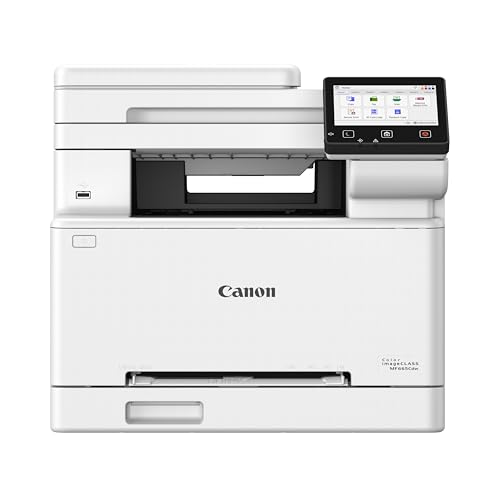
- Color, Wireless, Duplex 4-in-1: Print, scan, copy, fax.
- Fast Print Speeds: Print up to 26 ppm in both color and monochrome and spend less time waiting with a quick first print time of approximately 10.3 seconds.
- Easy Wireless Setup: Setup your wireless connection and get up and running in just a few steps.
Why it wins: The MF665Cdw combines automatic duplex printing with a 50-sheet, single-pass duplex ADF. Canon rates it at up to 26 letter-size pages per minute and includes a five-inch color touchscreen, fax, Ethernet, Wi-Fi, and a three-year limited warranty.
Independent testing found sharp documents, excellent scan quality, and fast handling of multi-page, two-sided originals. As a laser printer, it also avoids the dried printhead nozzles that can affect infrequently used inkjets.
Pros
- Fast black and color documents
- Single-pass duplex scanning
- Sharp text and detailed scans
- Three-year limited warranty
Cons
- Large and heavy
- Weak choice for photographs
- Four toner cartridges to maintain
Social proof: See reviews on Amazon.
Trade-offs / Who should skip
I would skip it for glossy photos, borderless artwork, or craft projects. Laser photo output has a narrower color range and more visible print patterns than a photo-focused inkjet.
Space is the second failure case. It measures 16.8 by 18.2 by 15.7 inches and weighs 48.5 pounds, so I would give it a permanent surface. Canon lists approximately 1 watt in standby and 0.3 watt in sleep mode.
Scores: Performance 4.8/5 | Document Workflow 4.9/5 | Ease of Use 4.5/5 | Value 4.0/5
Brother MFC-L2820DW — Best for black-and-white documents
My monochrome pick is fast, compact, and suited to forms, labels, schoolwork, and home-office documents.

- BEST FOR SMALL OFFICES – Combining space-saving efficiency and premium monochrome (black & white) print quality with affordability, the Brother MFC-L2820DW delivers dynamic laser print, copy, scan, and fax multi-functionality in a compact footprint
- EFFICIENT PRINTING & SCANNING – Produces black & white documents quickly with print speeds up to 36 ppm(2) and scan speeds up to 23.6/7.9 ipm(3) (bk/cl). A 50-page auto document feeder(4) allows for convenient, time saving multi-page copy, scan, and fax
- FLEXIBLE CONNECTION OPTIONS – Securely connect to multiple devices with built-in dual-band wireless (2.4GHz / 5GHz), Ethernet, or connect locally to a single computer via USB interface
Why it wins: Brother rates it at up to 34 pages per minute and equips it with a 250-sheet tray, 50-sheet ADF, automatic duplex printing, Ethernet, dual-band Wi-Fi, USB, and a 2.7-inch touchscreen.
Independent testing found sharp documents, high toner yields, low maintenance requirements, and very good scan quality. The separate drum eventually needs replacement, but toner changes are straightforward.
Pros
- Fast black-and-white printing
- Sharp text output
- 50-sheet document feeder
- Low maintenance requirements
Cons
- No color printing
- No automatic duplex scanning
- Separate drum consumable
Social proof: See reviews on Amazon.
Scores: Performance 4.5/5 | Document Workflow 4.2/5 | Ease of Use 4.4/5 | Value 4.6/5
Quick compare
- Best overall: Epson EcoTank ET-4950 — the strongest balance of ink economy, document handling, and color output.
- Best for multiple household users: Brother MFC-J4555DW — dual trays and flexible connectivity.
- Best for photos: Epson EcoTank Photo ET-8500 — six-color output and specialty-media support.
- Best color laser: Canon Color imageCLASS MF665Cdw — fast documents and one-pass duplex scanning.
- Best monochrome option: Brother MFC-L2820DW — fast, sharp, low-maintenance text printing.
As an Amazon Associate, I earn from qualifying purchases.